How to keep recipes online: a family cookbook that does not get lost
Published on October 14, 2026
A recipe written on paper gets stained, torn and lost. A recipe saved as screenshots gets buried in the gallery. One note per recipe, organized in folders and reachable by link, fixes both and also helps pass the recipe along.
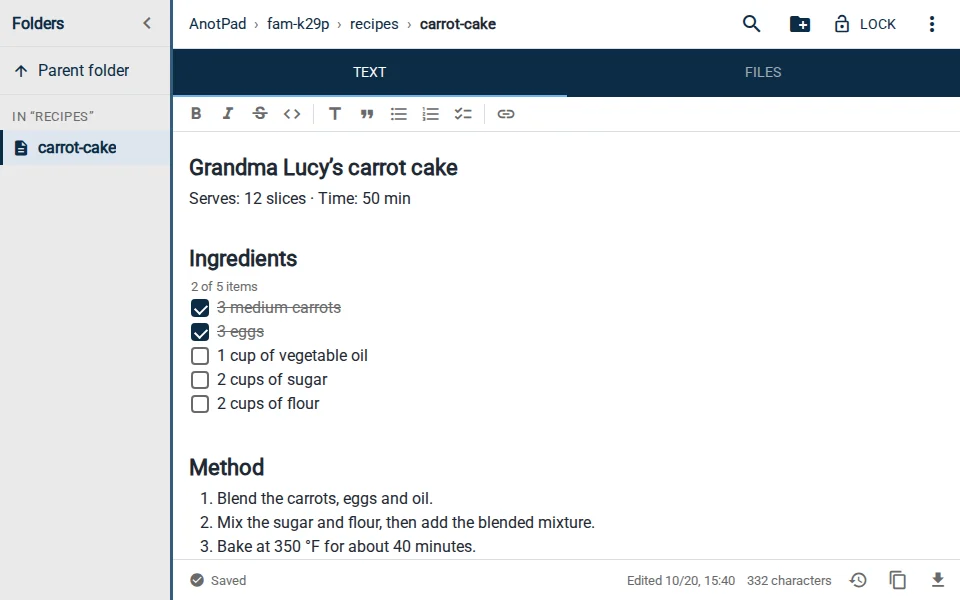
One note per recipe
Each recipe lives in its own note, with the dish name in the address: recipes-fam-k29p/carrot-cake. That makes it easy to find, to open straight on your phone and to share on its own.
The random chunk at the start (k29p) is what makes the folder hard to guess. The recipes inside can have simple names.
A template that works
A fixed structure makes all recipes look alike, and that is what makes the book easy to use:
- Dish name, servings and time at the top.
- Ingredients as a tickable list, to check what is already on the counter.
- Numbered method, one step per line.
- Notes: whose recipe it is, variations that worked, what not to do.
The recipe template already comes in this format: one click creates the note, and you replace the sample with your own recipe.
Organize in folders by type
| Address | What it holds |
|---|---|
recipes-fam-k29p/cakes | Cakes, pies and desserts |
recipes-fam-k29p/mains | Main dishes and sides |
recipes-fam-k29p/snacks | Breads, savories and snacks |
recipes-fam-k29p/parties | Recipes for large quantities |
Two or three folders are enough. To find a recipe by ingredient, use search (Ctrl+K), which looks through the names and text of the notes in the folder.
Attach the dish photo
In the note’s Files tab, attach a photo of the finished dish, and images are shrunk automatically (up to 2 MB per file). A photo helps you remember the expected result, and it stays with the recipe.
Share with the family
Send the recipe link in the family group chat. So nobody changes it by mistake, use "Copy read-only link" in the ⋮ menu. If you want everyone to add notes and variations, send the regular link and agree on who edits what.
For a recipe someone is reading out over the phone, ask them to open the same note: you both see the text appear in real time.
Moving old recipes into notes
Recipes from grandma’s notebook or loose papers do not need to be typed in all at once. A good order is to start with the ones you cook most, one per week, and leave the rest for later.
- Take a photo of the original page and attach it in the note’s Files tab. The handwriting is part of the recipe too.
- Type the ingredients as a list, one per line, with the amounts as written.
- Turn the method into numbered steps. Where the original says "until it is ready", add what you observe: color, texture, time.
- Under "Notes", write what changed in practice, such as your oven’s real temperature.
If a measure is out of use ("a tea cup", "a jelly jar"), keep the original and write the equivalent in grams or milliliters next to it. Whoever cooks it later will be grateful.
Family recipes have a story
Write down who taught you the recipe, on what occasion it is made and the memory that comes with it. Over time, that is worth as much as the recipe. And if someone in the family wants to take the book elsewhere, you can copy the text or download the note as a .txt file.
Notes by address can be opened by anyone with the link. Do not put personal data or sensitive information in the recipe book.
Start from a ready-made template
Read also
- What to pack for a trip: a list by trip type and how not to forget anythingA base list, what to change by trip type and a routine to check before leaving.
- How to organize notes in folders and subfoldersNames, levels and examples of simple structures that do not turn into a mess.
- Online notepad or app: which one to choose?When a page in the browser is enough and when a full app is worth it.