How to organize notes in folders and subfolders
Published on October 14, 2026
Taking notes is easy. Finding the right note weeks later is hard. A good folder structure fixes that without much effort.
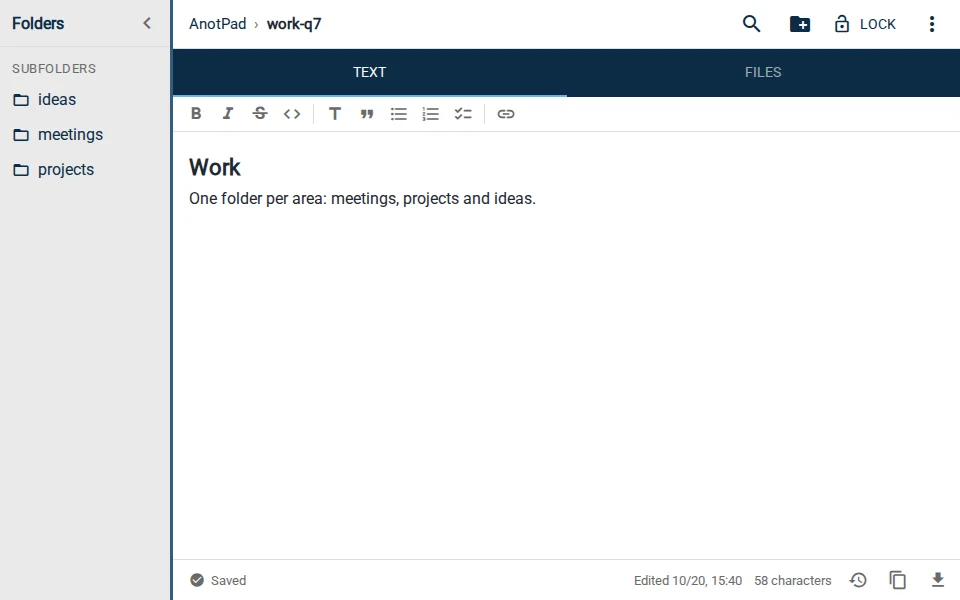
Start from what you look for, not from what you write
A helpful question is: "where would I look for this a month from now?". If the answer is "in the work stuff", that is your folder. Organizing by subject or project usually works better than organizing by type of note (list, draft, idea).
Few levels
Two or three levels are enough for almost everything. More than that and you spend more time deciding where to put things than taking notes. A structure like work/meetings/2026-10 already covers a lot.
- Level 1: the area of life (work, study, home).
- Level 2: the project or subject (meetings, college-networks, renovation).
- Level 3, if needed: the period or stage (2026-10, exam-1).
Names that sort themselves
Use lowercase letters, hyphens instead of spaces, and dates in year-month-day format. That way 2026-10-14 always shows up after 2026-10-02, and you never have to sort by hand.
Example structures
| Use | Example address |
|---|---|
Work meetings | work/meetings/2026-10-14 |
College courses | college/networks/lecture-03 |
Family recipes | home/recipes/carrot-cake |
Trip planning | trips/lisbon/itinerary |
How to do it in AnotPad
In AnotPad, folders come from the address itself: use slashes in the note name. The side panel shows the parent folder, the subfolders and the notes next to each other, and the new subfolder button creates a new level without typing the address. If you change your mind about a name, the ⋮ menu lets you rename the subfolder, taking everything inside it along.
Review from time to time
Once a month, delete what is no longer useful and merge similar notes. A small, up-to-date structure is worth more than a huge, abandoned one.
Common mistakes
- Creating too many folders right at the start, before you know what will go in them.
- Using vague names like "misc", "other" or "stuff": a month from now nobody remembers what is in there.
- Duplicating the same note in two folders "just in case". Pick one place and find it with search.
- Never reviewing: old folders pile up notes nobody uses anymore.
A full example: planning a renovation
Imagine you are going to renovate the bathroom. A home/renovation folder holds everything. Inside it, a "quotes" note with each professional’s prices, a "materials" note with the shopping list and a "schedule" note with the dates. If the renovation grows, "materials" becomes a subfolder, with one note per room. Since every note has an address, you send the link of the materials list to whoever is buying, and they see the latest version.
How to clean up the mess you already have
- List the 3 or 4 big subjects of your current notes.
- Create a folder for each one and move the most used notes first.
- For the rest, do not rush: move an old note when you need it.
- After a month, delete what was left unused.
Start from a ready-made template
Read also
- Online notepad or app: which one to choose?When a page in the browser is enough and when a full app is worth it.
- 8 ideas for notes you open by linkShared lists, meeting notes, recipes and other ways to use a note by address.
- What to store (and what to avoid) in online notesBasic care to use notes by address without exposing information you should not.