Weekly planner template
Updated on October 28, 2026
A short plan: three priorities for the week, each day’s tasks and a five-minute review on Sunday. It works on your phone and your computer.
This week’s priorities
Monday
Tuesday
Wednesday
Thursday
Friday
Weekend
Review (Sunday)
- What went well:
- What moves to next week:
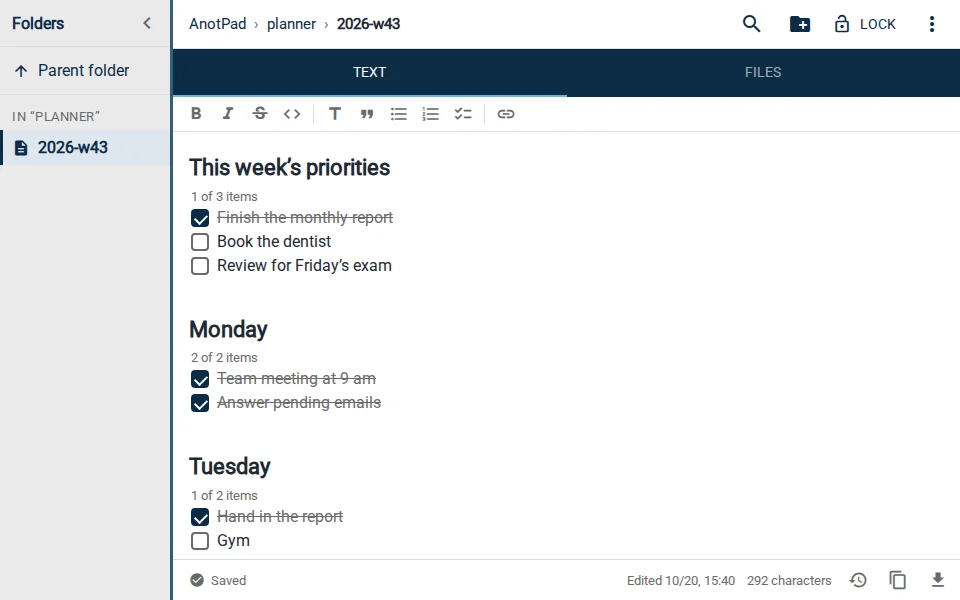
How to use it
- On Sunday or early Monday, create the note with "Use this template".
- Pick only three priorities. Whatever does not fit goes into the days.
- Tick tasks as you do them. Ctrl+Enter ticks the item where the cursor is.
- At the end of the week, fill in the review and carry over what is left to next week’s note.
Tips
- Name notes with the year and week, like planner/2026-w43, to keep a history.
- Time-bound commitments deserve a calendar reminder (⋮ menu › Create reminder).
- If a task keeps moving from week to week, break it into smaller parts or delete it.
A week that fits your time
The most common weekly planning mistake is putting in more tasks than the days can hold. Before you spread them out, check your calendar: days full of appointments get one or two tasks, free days get more. Also leave an empty slot on Friday for whatever always comes up at the last minute. A week with some slack ends with a sense of accomplishment; an overloaded one ends with guilt, even when a lot got done.
- The three priorities are what has to happen no matter what. If only they get done, the week was worth it.
- Big tasks become smaller steps, one per day: "report" becomes "gather the data", "write the first part" and "review".
- Use the Sunday review to learn about your own pace. Over time, you plan more and more realistic weeks.
- If you like a more thorough review, also use the weekly review template.
Read also
- Online checklist: how to make a to-do list you can tick item by itemHow to create, tick and organize a simple checklist, with shortcuts and examples.
- Weekly review templateEmpty the inbox, check the calendar and pick priorities.
- Daily journal templateShort prompts to write for five minutes a day.