How to write simple meeting notes (with a ready-to-copy template)
Published on October 14, 2026
Meetings without notes tend to repeat themselves: the next week, nobody remembers exactly what was decided or who was supposed to do what. Short notes, written during the meeting itself, fix that. They do not need to be a formal document; they need to be clear.
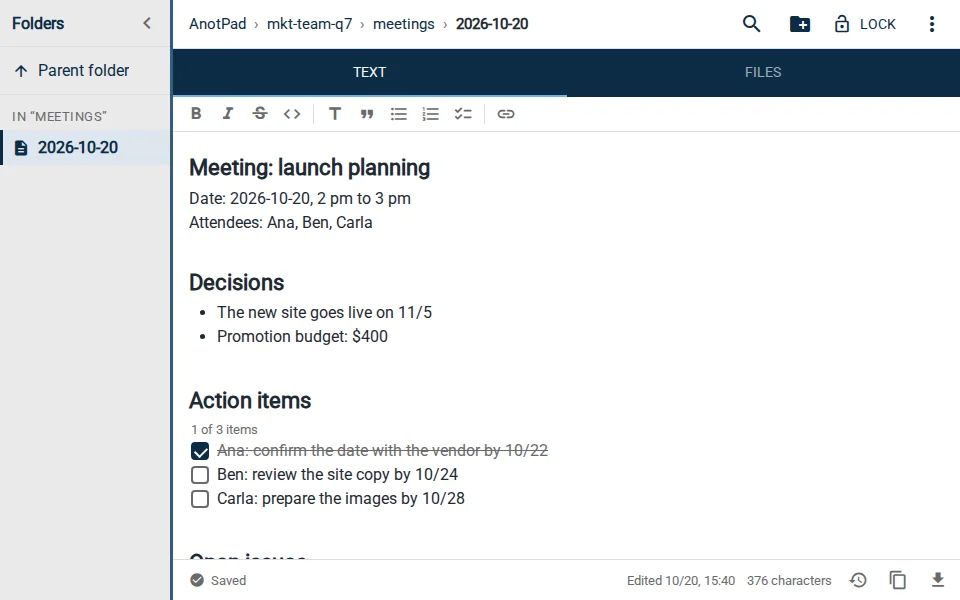
What meeting notes need
Useful notes answer four questions: when it was and who attended, what was discussed, what was decided and who will do what by when. Everything else is optional. If the notes from a one-hour meeting run longer than a page, they probably turned into a transcript.
Template to copy
Copy the lines below into a new note and fill them in during the meeting:
- MEETING: name or goal (e.g., Launch planning)
- DATE: 2026-10-20, 2 pm to 3 pm
- ATTENDEES: Ana, Ben, Carla
- AGENDA: 1) website deadline; 2) budget; 3) next steps
- DISCUSSION: one or two points per agenda item, only the essentials
- DECISIONS: what was decided, one line per decision
- ACTION ITEMS: who does what and by when (Ben: review copy by 10/24)
- OPEN ISSUES: what was left unanswered and must come back next meeting
- NEXT MEETING: date, if already set
Before the meeting
Create the notes before the meeting starts and fill in the agenda. If you send the link to attendees in advance, each of them can add items or questions. That makes the meeting shorter, because topics arrive organized.
A naming pattern helps you find everything later. For example: mkt-team-q7/meetings/2026-10-20. With the date in year-month-day format, the notes stay in chronological order in the side panel, and the latest one is always last.
During the meeting
- Pick one person to write. Notes written "by everyone" end up written by no one.
- Record decisions the moment they happen, using the words said. "We decided the site goes live on the 5th" beats "we talked about the deadline".
- Every action item needs a name and a date. Without them it is not a task; it is an intention.
- When the discussion goes in circles, record it as an open issue and move to the next item.
If the meeting is on video, the note taker can share their screen with the note open. Everyone follows along and corrects things on the spot, which avoids arguments later about what was said.
After the meeting
Review the notes within an hour, while you still remember the details, and send the link to the attendees and to anyone who needs to know the decisions. For people who only need to read, use "Copy read-only link" in the ⋮ menu: the note opens without the editing buttons.
So you do not forget the action items with deadlines, create a reminder from the notes themselves (⋮ menu › Create reminder). The event goes to your calendar with the note’s link, so on the day you open the notes straight from the alert.
A short example
A 30-minute meeting about the team’s year-end party. Decisions: it will be on 12/12, at the downtown restaurant, with a budget of $40 per person. Action items: Ana confirms the booking by 10/25; Ben builds the attendance list by 10/30. Open issue: secret Santa or not? Back at the next meeting. These notes fit in ten lines, and anyone who was not there understands what happened.
A word of caution
Notes kept in notes by address can be opened by anyone who knows the link. Do not record confidential company information, customer data or HR matters. For that, use your organization’s official system.
In short
Agenda before, decisions and action items during, review and sharing right after. With a fixed template and a naming pattern, meeting notes take a few minutes and save hours of repeated meetings.
Start from a ready-made template
Read also
- How to capture ideas quickly before they vanish: the inbox note methodOne note to drop everything into right away, and a weekly review to give each item a home.
- How to plan a trip with notes: itinerary, budget, bookings and packingFive notes that cover everything from the itinerary to packing, and how to use them on the road.
- Note reminders in your calendar: never forget what you wrote downA step-by-step to create the reminder and ideas for when it really helps.