How to plan a trip with notes: itinerary, budget, bookings and packing
Published on October 14, 2026
Planning a trip scatters information everywhere: hotel links in a chat, train times in a screenshot, the packing list on paper. When you need something, nothing is at hand. Gathering it all in a few organized notes fixes that, and lets you share the planning with whoever is coming along.
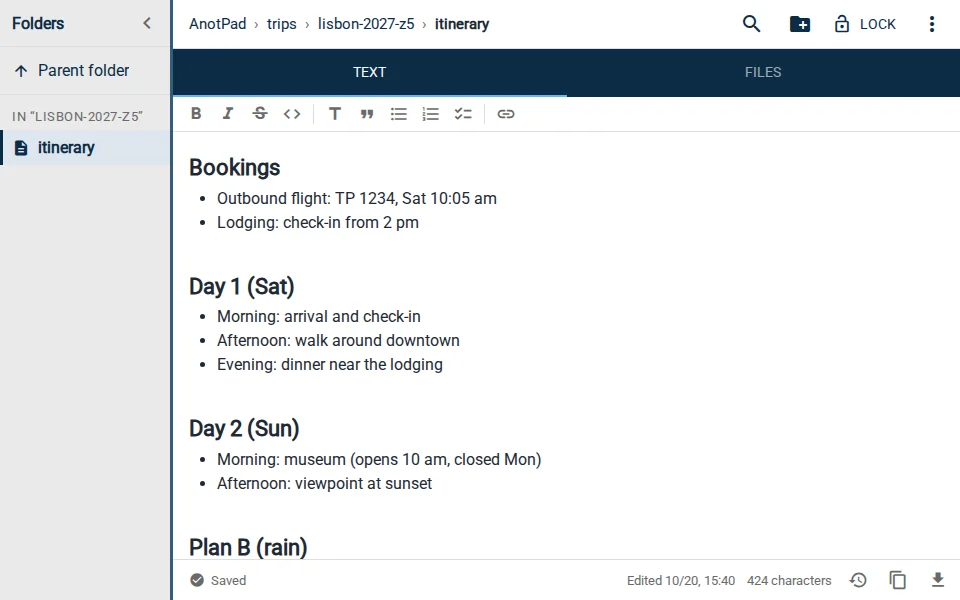
Five notes for a whole trip
| Note | What it holds |
|---|---|
trips/lisbon-2027-z5/itinerary | What to do each day, with addresses and times |
trips/lisbon-2027-z5/budget | Planned and actual spending |
trips/lisbon-2027-z5/bookings | Flights, lodging and tickets (codes and times) |
trips/lisbon-2027-z5/packing | What to bring |
trips/lisbon-2027-z5/info | Lodging address, transport, useful phone numbers |
A folder per trip, with the destination and year in the name, also becomes a record: on your next trip, the previous packing list is a great starting point.
Itinerary: one block per day
Split the itinerary by day and, within each day, by time of day. Do not overbook: one or two main plans per day, with the rest free, usually makes for a better trip than a list of twenty sights.
- DAY 1 (Sat): arrive 10 am › lodging › lunch nearby › free afternoon in the neighborhood
- DAY 2 (Sun): morning at the museum (opens 10 am, closed Mon) › afternoon at the viewpoint › dinner booked for 8 pm
- DAY 3 (Mon): day trip to the nearby town, 9:12 am train
- PLAN B (rain): covered market, aquarium
Write down the details that matter: the day a place is closed, whether you need to book, how long it takes to get there. Those details prevent most frustrations.
Budget: planned and actual side by side
In the budget note, list the categories (airfare, lodging, food, local transport, tours, shopping, a cushion for surprises) with the planned amount. During the trip, write the actual spending next to it once a day, ideally in the evening. At the end, you know exactly where the money went and can plan the next trip better.
Bookings and info: what you will need without internet
Keep each booking’s code, date, time and address in the bookings note. Screenshots of boarding passes and tickets can go in the same note’s Files tab, up to 2 MB each (images are shrunk automatically).
One important caveat: the note needs internet to open. Before you travel, make an offline copy of the essentials, such as the lodging address and flight code, as a screenshot or in the airline’s app. The note is your planning hub; the screenshot is plan B for when the signal drops.
Do not store passport numbers, card details or booking passwords. Anyone who knows the note’s address can open it.
A packing list that gets better every trip
Split the list into groups: documents, clothes, toiletries, electronics, medicine and "do not forget" (charger, plug adapter, house key). When you get back, open the list and write two things: what you brought and did not use, and what you missed. On the next trip, the list starts off more accurate.
Planning as a group
Send the folder link to your travel companions. Each person can add suggestions to the itinerary and mark what they have already booked, and changes show up for everyone in real time. To avoid two people rewriting the same part, agree on who owns each note: one person on the itinerary, another on the budget.
For time-bound commitments, like flight check-in or a restaurant booking, create a reminder from the ⋮ menu › Create reminder. The alert goes to your calendar with the note’s link.
In short
One folder per trip and five notes: itinerary, budget, bookings, packing and info. Everything is reachable from your phone, shared with your companions, and ready to serve as the base for your next trip.
Start from a ready-made template
Read also
- Note reminders in your calendar: never forget what you wrote downA step-by-step to create the reminder and ideas for when it really helps.
- Moving house checklist: what to do 30 days before, the week of and on the dayTasks split by deadline and a simple system to number and find your boxes.
- I deleted my text by mistake: how to recover it and avoid it next timeWhat to try first, how to use version history and habits that prevent the scare.