How to capture ideas quickly before they vanish: the inbox note method
Published on October 14, 2026
Good ideas rarely show up while you sit at your computer. They show up in the shower, in traffic, in the middle of a conversation. If writing them down means deciding where to file them, you give up. The trick is to separate two moments: capture now, organize later.
Capturing and organizing are different tasks
When you try to write and organize at the same time, every idea becomes a small decision: which folder? what name? next to what? That friction is enough to make you think "I will write it down later", and later never comes. The fix is one single place where everything lands first, without thinking, and a fixed time to organize.
Setting up the inbox note
- Create a note with a name only you know, like inbox-lu-9x.
- On your phone, add the address to the home screen (in the browser: menu › Add to Home screen). It then opens with a tap, like an app.
- On your computer, bookmark the note or keep it in a pinned tab.
- Make yourself a rule: anything worth remembering goes into this note, right away.
Because the note syncs in real time, what you write on your phone is already on your computer when you sit down to work.
How to write in the inbox note
- One idea per line, always at the top or always at the bottom. Pick one and stick to it.
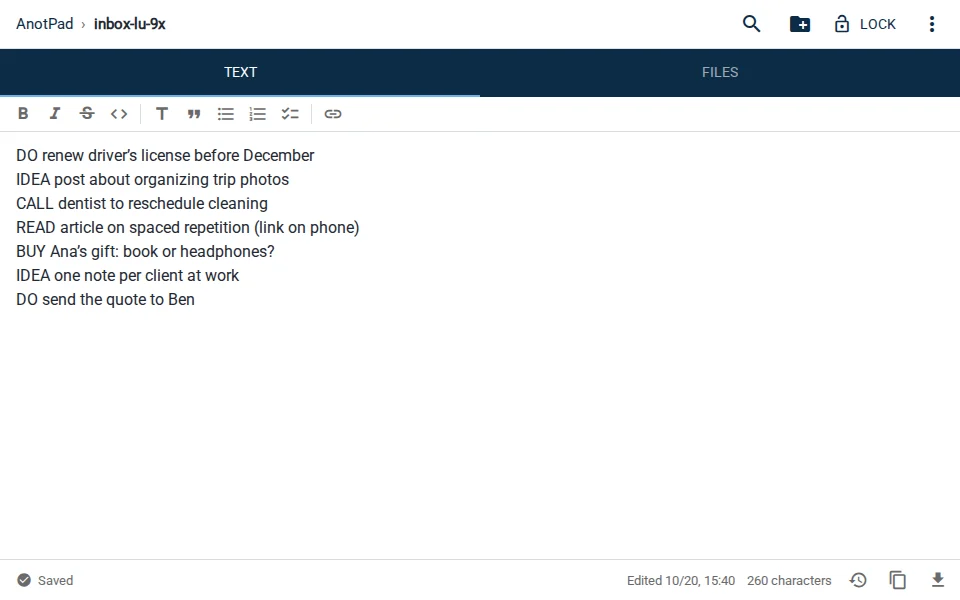
- Start with a word that says what kind it is: DO, IDEA, BUY, READ, CALL. During the review, this speeds things up a lot.
- Write enough to understand it a week from now. "Call" says nothing; "CALL dentist reschedule cleaning" does.
- Do not fix, format or organize. The inbox note is allowed to be ugly.
The 15-minute weekly review
Once a week, at a fixed time (Sunday evening, Friday at the end of the workday), open the inbox note and give each line a destination:
- Takes less than two minutes? Do it now and delete the line.
- Has a date? Create a calendar reminder (⋮ menu › Create reminder) or move it to your deadlines note.
- Belongs to a project? Move it to the project’s folder, like work/new-website/ideas.
- Something to read or watch? Move it to a "read-later" note.
- No longer makes sense? Delete it without guilt.
At the end of the review, the inbox note should be empty or nearly so. If you delete something you should not have, the clock icon in the bottom bar keeps the last 2 versions of the text.
Why this works
Two things happen when you trust that everything is written down in one place. First, you stop spending energy trying to remember. Second, the ideas that really matter survive, because they go through a review instead of getting lost in chats, screenshots and loose paper.
The method does not depend on any particular app. What matters is that the inbox note opens fast, on any device, without a login, which is why a note by address fits it so well.
Common mistakes
- Having several inbox notes (one on the phone, another on the computer, another on paper). It turns into the same mess as before.
- Skipping the review. Without it, the inbox note becomes a graveyard of ideas.
- Using the inbox note to store passwords or personal data. It is open to anyone who knows the address.
In short
One place to capture, opened with a tap. One fixed time to organize, once a week. That is enough to stop losing ideas.
Start from a ready-made template
Read also
- How to plan a trip with notes: itinerary, budget, bookings and packingFive notes that cover everything from the itinerary to packing, and how to use them on the road.
- Note reminders in your calendar: never forget what you wrote downA step-by-step to create the reminder and ideas for when it really helps.
- Moving house checklist: what to do 30 days before, the week of and on the dayTasks split by deadline and a simple system to number and find your boxes.