How to write drafts without getting stuck: a four-step method
Published on October 14, 2026
People who freeze in front of a blank page are usually trying to do everything at once: think about what to say, the order, the words and the typos. That is too much for one head. Splitting writing into steps, each with a single goal, takes the pressure off and makes the text better.
Step 1: dump
Open a new note and write everything you know about the topic, in whatever order it comes, without deleting anything. Loose sentences, keywords, questions, examples, even things you think will not make it in. Give yourself a short time, like ten minutes, and keep writing.
The goal is not to write well; it is to get the ideas out of your head and somewhere you can see them. An ugly text on screen is much easier to improve than a perfect text that does not exist yet.
Step 2: organize
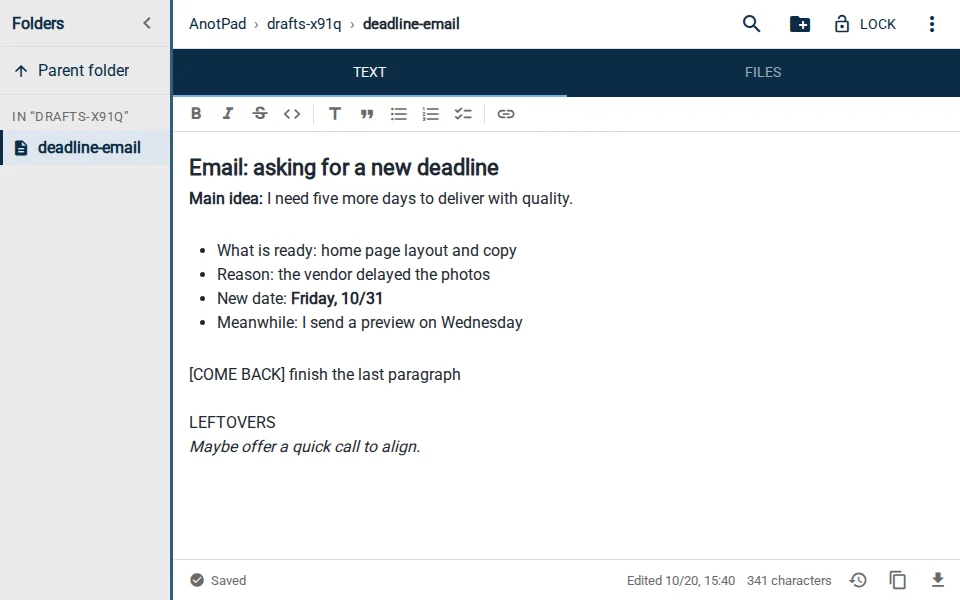
Read what you dumped and answer two questions: what is the main idea (in one sentence)? And what are the three to five points that support it? Write the main sentence at the top and the points right below, in order. That is the skeleton of your text.
Whatever does not serve any of the points, move to the end of the note under a "LEFTOVERS" line. Do not delete it: sometimes a leftover becomes the perfect example later.
Step 3: write
Now write the real text, point by point, following the skeleton. Since you already know what to say and in what order, the writing flows much better. If you get stuck on a point, leave a marker like [COME BACK] and move on. Finishing a complete draft, even an imperfect one, is worth more than one perfect paragraph.
- Short sentences are easier to write and to read.
- One paragraph, one idea.
- Start with the part you know best, not necessarily the introduction.
Step 4: revise, ideally the next day
Distance helps you see problems. If you can, revise the next day, or at least after a break. Read the text out loud: overly long sentences and repetition jump out immediately. Then search for the [COME BACK] markers (Ctrl+F) and resolve each one.
- Cut what does not help the main idea, even if it is well written.
- Replace vague words ("thing", "issue", "aspect") with concrete ones.
- Check names, numbers and dates.
- Only at the end, check spelling and punctuation.
Where to write the draft
A plain notepad has a not-so-obvious advantage: with no formatting buttons, you do not get distracted picking fonts and bold when you should be thinking. Formatting comes at the end, wherever the text will be published.
A note by address also lets you start the draft on your phone when the idea strikes and finish it on your computer, with a keyboard. And if you delete a passage you later want back, version history (the clock icon in the bottom bar) keeps the last 2 versions of the text. For long, important texts, keep a copy outside the note as well.
An example: a difficult email
You need to ask a client for more time. Dump: the reason for the delay, what is already done, the new deadline, the fear of looking disorganized. Organize: main idea, "I need five more days to deliver with quality"; points, what is ready, the reason, the new date and what the client gets in the meantime. Write: one paragraph per point. Revise: cut the repeated apologies and make the new date stand out. The email that would have taken an hour of anxiety is done in twenty minutes.
In short
Dump without judging, organize into a skeleton, write point by point and revise with some distance. Each step has a single job, and that is what clears the block.
Start from a ready-made template
Read also
- Keyboard shortcuts to take notes faster in your browserThe editing shortcuts everyone should know, plus AnotPad’s own.
- Online notes without sign-up: how to start in one minute and what to know firstHow to start in a minute, what you gain and what you give up without an account.
- Online checklist: how to make a to-do list you can tick item by itemHow to create, tick and organize a simple checklist, with shortcuts and examples.