Shared shopping list: how to set up one the whole family actually uses
Published on October 14, 2026
A paper shopping list on the fridge door has one problem: it stays home while you are at the store. A list on one person’s phone has another: nobody else can add anything. A shared list solves both, as long as it is simple enough for everyone to use.
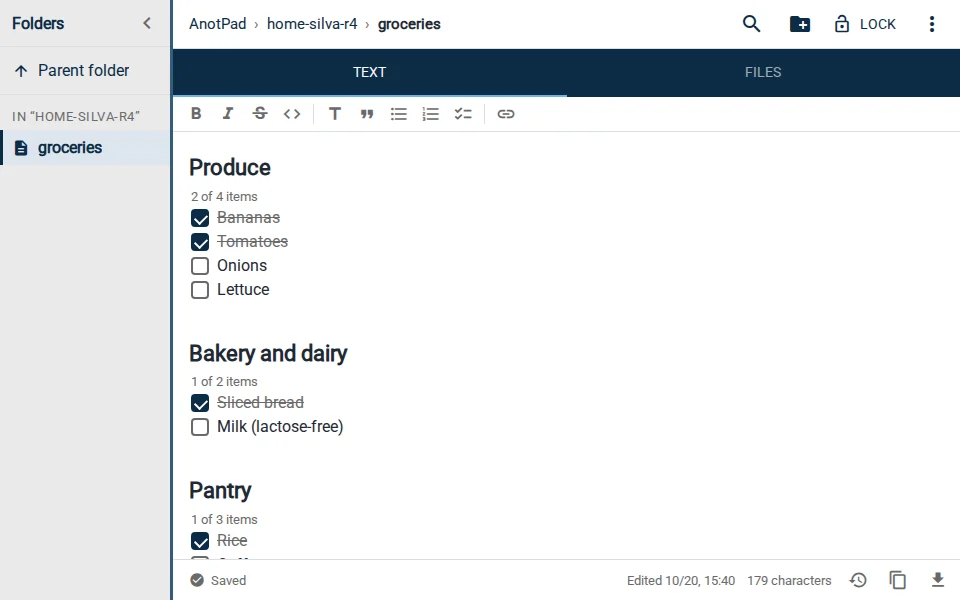
What a good shared list needs
- Everyone at home can open and edit it, with nothing to install and no account to create.
- What someone adds shows up for the others right away, including whoever is already at the store.
- It follows the order you walk through the store, so you do not go back to the same aisle three times.
- It is easy to clear after shopping, without losing the items you buy every week.
Setting up the list in a note with an address
- Create a note with a name only your family knows, like home-silva-r4/groceries.
- Send the link to the family group chat. Anyone who taps it lands on the list, ready to edit.
- Ask everyone to add the link to their phone’s home screen (in the browser: menu › Add to Home screen). It then opens like an app.
- Write the items by section, using the template below as a starting point.
Because the note syncs in real time, if someone remembers coffee while you are in the dairy aisle, the item appears on your screen without you doing anything. If two people edit at the same time, AnotPad warns you and lets you choose which version to keep.
A template by store section
Sorting by section is what saves the most time. Adjust the order to the store you usually go to:
- PRODUCE: bananas, tomatoes, onions, lettuce
- BAKERY: sliced bread
- DAIRY AND DELI: milk, cheese, yogurt
- MEAT: chicken
- PANTRY: rice, beans, coffee, pasta
- CLEANING: dish soap, laundry detergent
- PERSONAL CARE: toothpaste, toilet paper
One line per section, with items separated by commas, fits on a phone screen. Anyone who prefers can use one item per line with a dash in front; what matters is that the whole house follows the same format.
House rules that make the list work
- Ran out, wrote it down: whoever uses the last package adds the item right away.
- Add details only when they matter: "milk (lactose-free)" avoids a mix-up, "bananas" needs no explanation.
- Whoever is shopping deletes what is already in the cart. That way, whoever is at home knows what is still missing.
- Items from another store (pharmacy, pet shop) go in another note in the same folder, like home-silva-r4/pharmacy.
The items you buy every week
Create a second note, home-silva-r4/staples, with what you always buy. Before heading out, open the staples, check the pantry and copy to the list only what is running low. In a few minutes the list is complete without relying on anyone’s memory.
If you wipe the whole list by mistake after shopping, no problem: the clock icon in the bottom bar keeps the last 2 versions of the text.
Using the list to keep an eye on spending
At the end of the trip, before clearing the list, write the receipt total at the bottom with the date, for example "2026-10-18: $95". After a month you have a clear idea of how much the household spends per week, and a home-silva-r4/spending note can collect those totals. It is not a finance app, but for many families it is enough.
The list is open to anyone with the address. Do not put passwords, card numbers or ID details in it.
In short
A shared list works when it is easy to open, easy to edit and organized the way you shop. A note with an address takes care of the technical part; your house rules take care of the rest.
Start from a ready-made template
Read also
- Class notes: how to organize them by subject and review for examsA folder per subject, a note template and a 15-minute review routine.
- How to write simple meeting notes (with a ready-to-copy template)A lean template and what to write before, during and after the meeting.
- How to capture ideas quickly before they vanish: the inbox note methodOne note to drop everything into right away, and a weekly review to give each item a home.